Property management, built natively on Oracle NetSuite

Request a demo

Rioo Portals & Mobile

The right front door for everyone

Community managers get an operational hub. Tenants get a self-service home for payments, requests, documents and amenities. Teams get mobile access in the field. Everyone works from the same records.

Access is part of the product

A platform is only as good as the experience of the people who touch it every day. Most residents will never see your back office. They'll see a payment screen, a request form and a notice. Most community managers don't want an ERP. They want a dashboard of today. RIOO's portals give each group a focused view, while every action writes back to the shared system of record in NetSuite.

Access is part of…{tenant_name}{unit}Merge fieldsOn recordBranded PDF

Why it matters to finance and operations

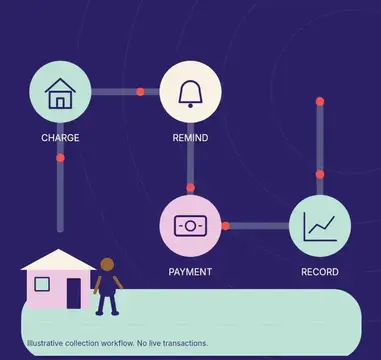
Self-service isn't only about convenience. When a payment made in the portal posts straight to the tenant ledger and the GL, there's nothing to key in. When a request submitted in the portal becomes a work order automatically, nothing is lost in transcription. The portal is the start of the workflow, not a separate silo.

Why it mattersLate journalsSync jobs failSpreadsheet recsLate, unclearnumbers

What is a property management portal?

A property management portal is a secure web or mobile space where tenants, residents and community managers handle their own tasks: paying rent, submitting maintenance requests, reading notices, signing renewals and booking amenities. In RIOO, every portal action writes to the NetSuite records behind it, so self-service and back-office accounting stay the same data.

Portals are often bought as add-ons and judged on appearance. The more useful test is what happens after a tenant clicks submit. If a payment lands in a holding area for someone to post, or a request becomes an email that has to be retyped as a work order, the portal has moved the work rather than removed it. RIOO portals are the first step of a workflow that finishes in NetSuite.

CCAMGGross-upNNOIEEstoppel

How it works

How does RIOO Portals & Mobile work in RIOO?

RIOO Portals and Mobile work in four steps: invite people at move-in or by role, let them serve themselves, turn each action into a back-office record, and keep everyone informed. Because portal actions write to NetSuite records, payments and requests need no re-keying by the office team.

SMSRent due on the 1stEmailInspection booked for TuePushWork order completedEmailLease renewal ready to sign
  1. 01

    Invite

    Residents and tenants receive portal access at move-in. Managers get access by role.

  2. 02

    Self-serve

    Tenants pay, request, renew and book without calling the office.

  3. 03

    Act

    Requests become work orders and payments post to the ledger, without manual steps.

  4. 04

    Communicate

    Announcements, notices and updates reach the right people, by portal, email or SMS through connected messaging services.

    Messaging →

How it works

How do you launch a resident portal across a portfolio?

You launch a resident portal across a portfolio in phases: configure it once, pilot at one or two properties, then roll out property by property with a clear switch-over date for payments and requests. Operators who make the portal the default channel from launch day usually reach strong adoption faster than those who run it beside old channels.

Go-live readinessConfigure oncePilotSet a switch-over dateInvite in wavesMeasure and follow upReadyfor go-live
  1. 01

    Configure once

    Set branding, payment methods, request categories, notice templates and amenity rules for the portfolio.

  2. 02

    Pilot

    Launch at one or two properties, invite every resident and fix questions before scaling.

  3. 03

    Set a switch-over date

    Announce when payments and requests move to the portal, and stop accepting the old channels where your leases and local rules allow.

  4. 04

    Invite in waves

    Send invitations property by property, with a short guide and staff ready to help.

  5. 05

    Measure and follow up

    Track activation, online payment share and requests by channel, then contact residents who have not logged in.

In detail

How does RIOO keep portal access secure?

RIOO keeps portal access secure by limiting each user to the records their role allows and by recording what they do. Tenants see only their own leases, balances and requests; community managers see only their assigned properties; and staff permissions follow NetSuite roles, so access is reviewed in one place rather than across separate systems.

AccessRoles and permissionsApplicationNetSuite controlsDataChanges loggedInfrastructureOracle Cloud

Scoped tenant access

Each tenant sees their own lease, ledger, documents and requests, and nothing about neighbours.

Property-level staff access

Community managers and site teams are limited to the properties they run.

Role-based permissions

Back-office access follows NetSuite roles managed by your administrator.

Payment data handling

Card and bank details are processed by the connected payment gateway rather than stored in the portal.

Sign-in protection

Password rules and optional multi-factor authentication.

Activity history

Payments, requests and document views are logged on the record.

Compare

How do teams put RIOO Portals & Mobile into practice?

Putting RIOO portals into practice means choosing the right channel for each audience and making the portal the default way to pay, request and receive notices. The channel table below matches common needs to the right portal or app, and the adoption tips come from typical rollouts.

Portals only help if people use them. Successful rollouts usually make the portal the default: payments, requests and notices all go there first. Teams invite residents at move-in, show them the app during the welcome, and answer questions by pointing to the portal rather than around it. Measure adoption, such as portal payment share and requests submitted online, and follow up where it's low.

Ask to see each portal with your own scenario.

Hi Wei,Rent due on the 1st$2,200Pay nowNeedBest channelTenant portalMobile appPaymentreceivedRequestscheduled
NeedBest channel
Daily community operationsCommunity manager portal
Resident self-service on a laptopTenant portal
Resident self-service on the goMobile app
Field maintenanceMobile app for technicians
Finance and reportingNetSuite with RIOO dashboards

Mapped to NetSuite

What happens in NetSuite when a tenant uses the portal?

When a tenant uses the RIOO portal, the action creates or updates a NetSuite-backed record straight away: a payment becomes a customer payment applied to open invoices, a request becomes a work order on the unit, and a signed renewal updates the lease and its future charges. Nothing waits for an import.

  1. Tenant action in the portalPays rent onlineRecord RIOO createsCustomer payment applied to invoicesCash and receivables update
  2. Tenant action in the portalEnrols in autopayRecord RIOO createsRecurring payment authorisation Future payments post on due dates
  3. Tenant action in the portalSubmits a maintenance requestRecord RIOO createsService request and work orderRepair costs code to the unit later
  4. Tenant action in the portalSigns a renewalRecord RIOO createsLease amendment with new termFuture rent charges regenerated
  5. Tenant action in the portalBooks an amenityRecord RIOO createsReservation, with fee if chargedFee invoice posts to amenity income
  6. Tenant action in the portalDownloads a statementRecord RIOO createsNo new recordReads live tenant ledger

Who are RIOO portals NOT for?

RIOO portals are not public listing websites or marketing site builders. They serve people with an existing relationship, such as residents, commercial tenants and community managers, after an application or lease. Advertising vacancies to the public is handled through listing syndication and your website, which can link to RIOO applications.

The portals are also not guest apps for short-term stays. Hotel-style check-in, nightly bookings and guest messaging across booking channels need hospitality software.

In scopeProperty…Portals & mobileNetSuite…Hotel PMSout of scopeEquipment rentalout of scopeNo-ERP landlordsout of scopeStated plainly

RIOO Portals & Mobile in practice

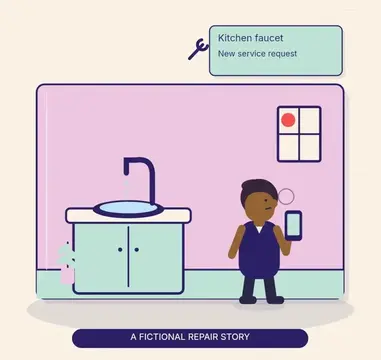
A resident books the clubhouse for Saturday, pays this month's rent and reports a broken blind, all in four minutes on their phone. The community manager sees the booking on the calendar, finance sees the payment in receivables, and maintenance sees a new work order. Nobody called the office.

TodayUnit 305Leak under sinkPhoto beforeParts usedPhoto afterResident sign-offPhotos on the jobCaptured on sitePosted to NetSuite

What changes

What changes when RIOO Portals & Mobile runs on NetSuite?

When RIOO Portals & Mobile runs on NetSuite through RIOO, operational work and accounting stop being two separate jobs. Transactions post to the general ledger as they happen, reports use the same records as daily work, and controls come from NetSuite roles and approvals. The changes below are the ones teams usually notice first.

BeforeWith RIOOLeads in spreadsheetsOne lead recordLease data re-keyedLease drives billingRenewals missedRenewals queued
  • Fewer calls and emailsto the office.
  • Faster paymentswith online, recurring options.
  • Higher resident satisfactionthrough transparency.
  • No re-keyingbetween portals and back office.

Use cases

Which portal metrics show adoption?

Five portal metrics show whether residents and managers have really adopted self-service. Each can be reported by property from RIOO data in NetSuite, and each points to a specific next step, such as a reminder campaign, a staff refresher or a change in how the office answers phone calls.

After go-liveHypercareGo-liveCheck-ins with your teamRent runFirst billing cycleCloseFirst month-endHandoverHand-off to support
01

Activation rate

Residents who have logged in at least once, as a share of residents invited.

02

Online payment share

Portal and autopay receipts as a share of all rent receipts.

03

Autopay enrolment

Residents with recurring payments set up, which predicts on-time collection.

04

Requests by channel

Maintenance requests submitted in the portal versus by phone or email.

05

Notice reach

Announcements opened or acknowledged, important for safety and access notices.

Checklist

Portal launch checklist

Portal launch checklistMap chart of accountsAgree approval limitsClean tenant recordsSchedule trainingConfirm data owners3/5complete
  • Confirm payment methods and fees for each property.
  • Load accurate resident emails and phone numbers before inviting.
  • Set maintenance request categories, priorities and emergency instructions.
  • Publish house rules, lease documents and notices in the portal.
  • Configure amenity booking rules and any fees.
  • Train site staff to point residents to the portal first.
  • Agree the switch-over date for payments and requests.
  • Report activation and online payment share weekly during rollout.

Talk to a specialist

See RIOO Portals & Mobile on your own portfolio.

Everyone works from the same records.

FAQ

RIOO Portals & Mobile FAQs

Still curious? Ask the team.

Is the tenant portal available 24/7?

The RIOO tenant portal is web-based, so tenants can use it outside office hours from any modern browser on a phone, tablet or computer. They can check balances, pay rent, submit maintenance requests with photos and download documents whenever suits them, and evening or weekend payments and requests are on their records for staff the next working day.

Can community managers post announcements?

Yes. Community managers can post announcements, events and urgent alerts to a whole community, a building or selected residents from the community manager portal. Messages appear in the tenant portal and can also go out by email or SMS through connected messaging services, with a record of what was sent and when.

Do portal payments post automatically?

Yes. Payments made in the RIOO portal post automatically to the tenant's ledger and the NetSuite general ledger, applied to open invoices by your allocation rules. Finance sees receivables update as payments arrive, with no batch import or manual posting, and the tenant sees the payment on their statement straight away.

Are there native mobile apps?

RIOO lists iOS and Android apps for mobile use by teams and residents, alongside the browser-based portals, which work on any phone. Confirm in your demo which app features are available for residents, community managers and maintenance technicians in your markets.

Can commercial tenants use the same portal as residents?

Yes. Commercial tenants use the RIOO tenant portal to view invoices, statements and service charge details, pay online and submit service requests for their suites. What each tenant sees depends on its lease, so a retail or office tenant sees recoveries and commercial invoices rather than residential features such as amenity bookings.

Give every resident and manager a better front door.