









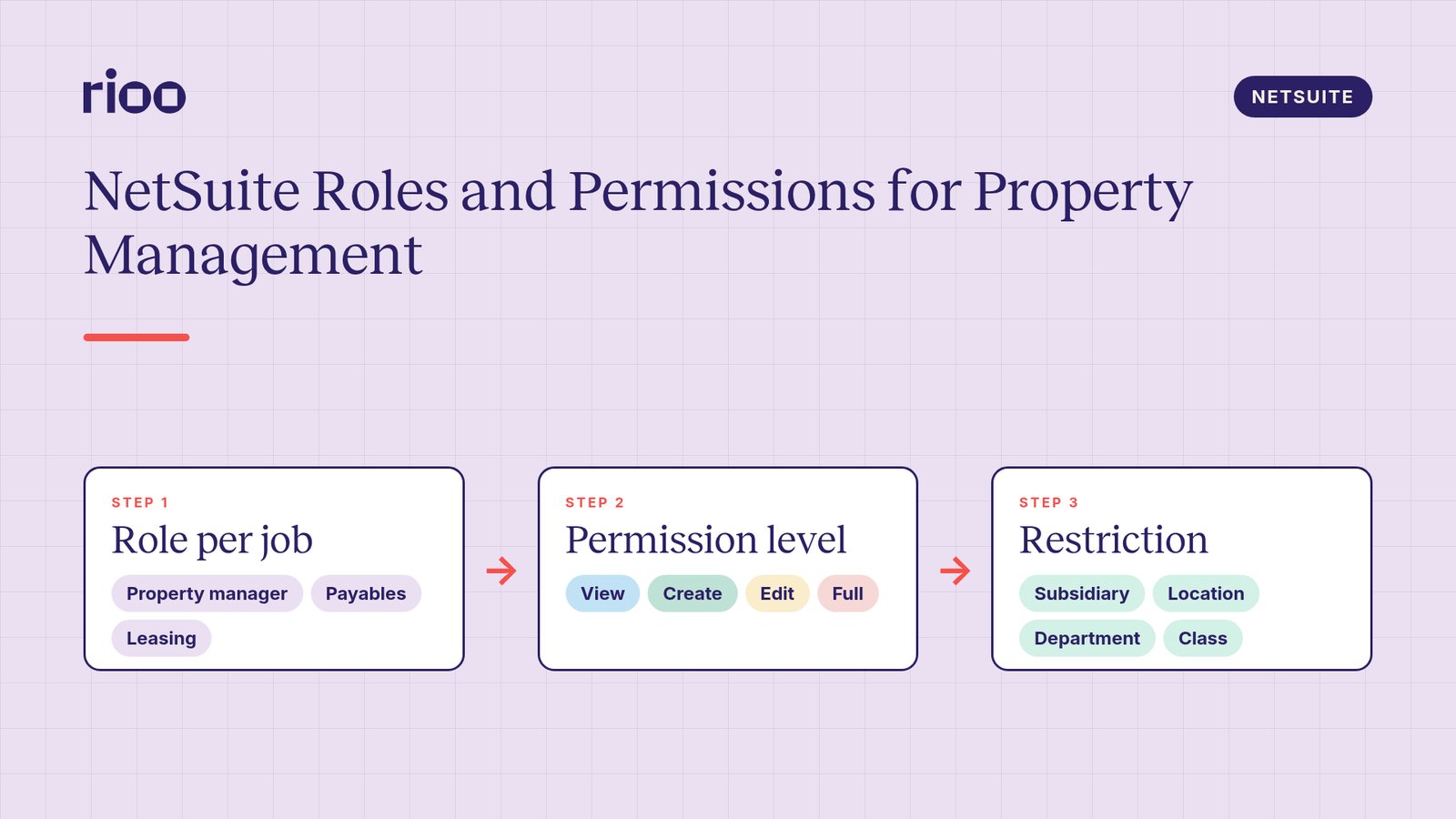
Short answer: set up NetSuite roles and permissions for property management around jobs, not people. Build a small set of custom roles, such as property manager, leasing, maintenance coordinator, payables and property accountant. Give each one the lowest permission level that lets the job get done, and restrict it to the right subsidiaries, locations, departments or classes. Keep requesting, approving and paying in separate roles. Then review who holds which role on a fixed schedule and remove access on the day someone leaves.
A property company on NetSuite often has more users than a finance only business of the same size. Site managers raise purchases. Leasing staff work with tenant records. Maintenance coordinators touch vendors and work orders. Accountants post and approve. Each group needs a different slice of the same database. Role design decides whether that slice is right.
This guide explains how NetSuite access works, then maps it to the jobs in a property business.
How NetSuite access works
NetSuite controls access through roles. A user can hold more than one role and switch between them. Each role combines two things.
Permissions
Permissions decide which records, transactions, reports and setup pages a role can reach. They are grouped on the role record under Transactions, Reports, Lists, Setup and Custom Records. Many permissions have a level:
- View: see existing records.
- Create: view and create.
- Edit: view, create and change.
- Full: everything, including delete.
Some permissions only offer certain levels. Full includes the right to delete, so keep it for a small number of roles.
Restrictions
Restrictions decide which records within a permission a role can see. In NetSuite OneWorld, the role's subsidiary restriction can be set to all subsidiaries, active subsidiaries only, the user's own subsidiary, or a selected list. Roles can also be restricted by department, class or location. A restriction set to "own and subordinates only" limits the user to records with their own value and its children.
Two settings matter for property teams. "Allow Viewing" lets a role see, but not edit, records outside its restriction. "Allow Cross Subsidiary Record Viewing" does the same across subsidiaries. Both are useful for regional or portfolio roles that need to read widely but act narrowly.
In OneWorld, subsidiary restrictions also flow through to departments, classes and locations. A role restricted to one subsidiary only sees the locations assigned to that subsidiary.
Map property jobs to roles
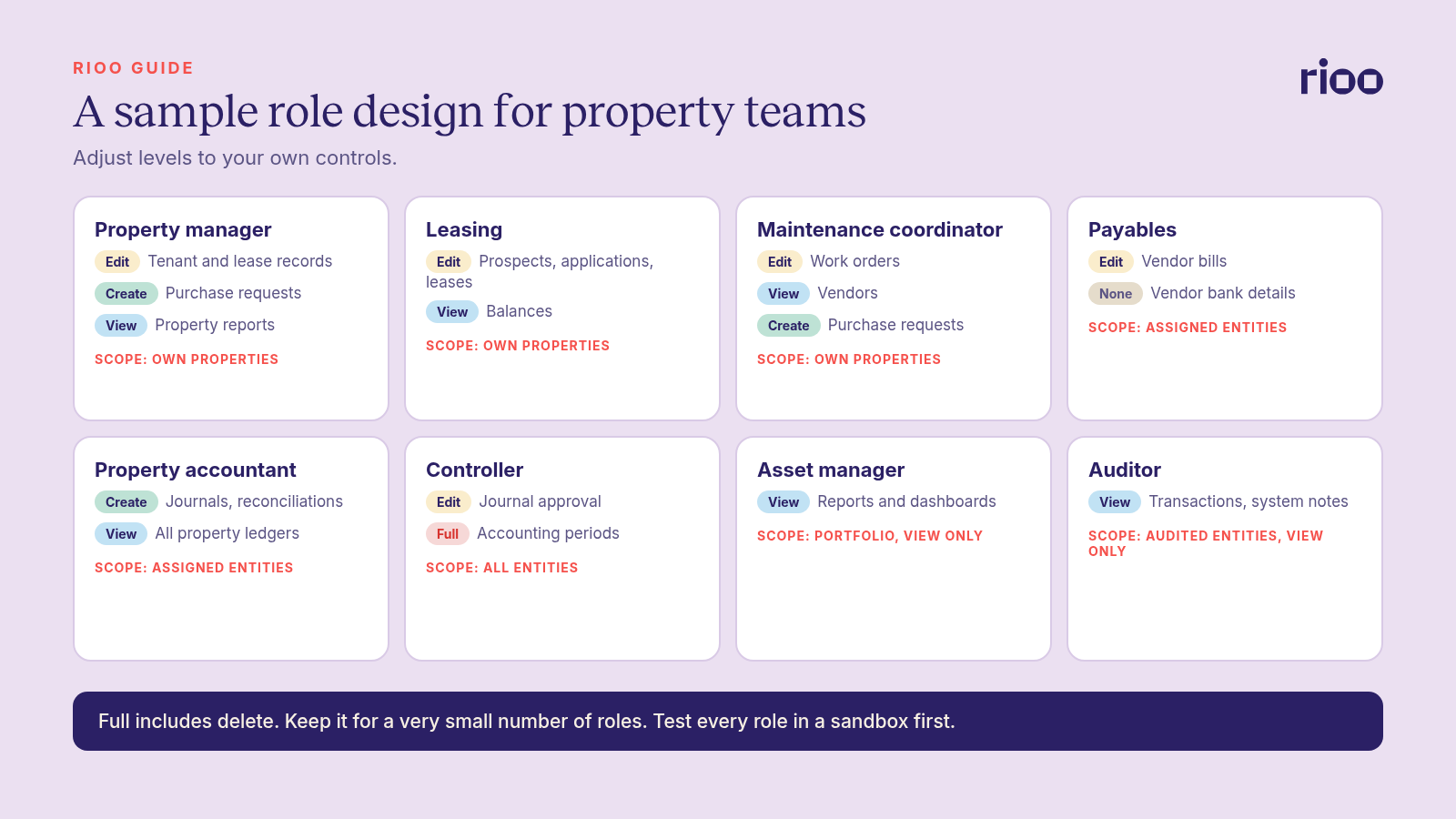
Start with the jobs. The table below is a sample design. Adjust the levels to your own controls and test each role in a sandbox before go live.
| Role | Typical access | Restriction |
|---|---|---|
| Property manager | Edit tenant and lease records, create purchase requests, view property reports | Own properties |
| Leasing | Create and edit prospects, applications and leases, view balances | Own properties |
| Maintenance coordinator | Edit work orders, view vendors, create purchase requests | Own properties |
| Payables | Create and edit vendor bills, no vendor bank detail changes | Assigned entities |
| Property accountant | Create journals and reconciliations, view all property ledgers | Assigned entities |
| Controller | Approve journals, manage period close | All entities |
| Asset manager | View reports and dashboards | Assigned portfolio, view only |
| Auditor | View transactions and system notes | Entities under audit, view only |
Design principles
Copy, then customise
Start from a standard NetSuite role close to the job, customise a copy and give it a clear name. Leave the standard roles untouched so you have a clean reference.
Lowest level that works
If a leasing agent only needs to read a balance, View is enough. Each step up should have a reason you could explain to an auditor.
Restrict by property structure
Property access usually follows the way properties are represented in the account. If each owning entity is a subsidiary, restrict by subsidiary. If properties are locations or classes, restrict on that segment. Decide this during setup, because changing it later means reworking roles. Our guide to setting up NetSuite for property management covers those structure choices.
Separate the money steps
The person who sets up a vendor should not be the person who approves the bill, and neither should release the payment. Build those steps into different roles. Our pieces on segregation of duties by portfolio size and on designing an AP approval matrix show how to split them in small and large teams.
Protect the Administrator role
Keep the Administrator role to a very small group. NetSuite requires two factor authentication for highly privileged roles, including Administrator. Day to day work should happen in other roles, even for the people who hold it.
Name roles so anyone can read them
Use names that describe the job and the scope, such as "Property Manager, Residential" or "Payables, UK Entities". A reviewer should understand a role from its name without opening it. Keep a short role catalogue that lists each role, its purpose and its owner.
One person, one login
Shared logins destroy the audit trail. Every user gets their own login, and every action is then tied to a name.
Users outside your team
Not everyone who needs property data should get a NetSuite role. Think about each outside group separately.
- Residents and commercial tenants see their own lease, balance, requests and documents through a tenant portal, not a NetSuite role.
- Owners and investors receive statements and reports through an owner portal or a reporting pack.
- Vendors work through a vendor portal or email, with bills entered by your payables team.
- External auditors get a view only role, restricted to the entities under audit, with an end date agreed up front.
- Consultants and implementation partners get named logins with time limited access. Remove them when the project ends.
Write the end date into the access request for every outside user. Temporary access that nobody removes becomes permanent by default.
The access lifecycle
Role design is half the job. The other half is keeping assignments current. For the wider picture on data privacy and security controls, see our guide to security and data privacy in NetSuite property management.
- Request. A manager asks for access for a named person, with the job and the properties.
- Approve. The process owner checks the request against the role design.
- Assign. The administrator adds the role on the employee record. Check the employee's subsidiary, location, department or class there too, because the role's restrictions are measured against those values.
- Change. When someone moves property or job, change the role or restriction on the same day.
- Remove. When someone leaves, remove access on their last day.
- Review. On a set schedule, such as each quarter, managers confirm that every user still needs every role.
NetSuite records changes through system notes on records and keeps a login audit trail. Use both during reviews to check that access matches the approved list.
A worked example
This is an illustrative case. A property manager, Dana, moves from the North region to the South region on the first of the month.
- Her role stays the same: property manager.
- The administrator changes her restriction from the North properties to the South properties.
- Open purchase requests she raised for North stay with the North team, and her new manager confirms the change in the access log.
- At the next quarterly review, her access shows only the South properties. No custom permissions were added along the way.
Because access follows the role, the move is a small change rather than a rebuild.
Who owns each step
| Task | Owner |
|---|---|
| Role design and naming | NetSuite administrator with the controller |
| Access requests | Line manager |
| Approval | Process owner, such as the controller for finance roles |
| Assignment and removal | NetSuite administrator |
| Periodic access review | Each manager, coordinated by finance |
| Review sign off | Controller or CFO |
Common mistakes
- A role per person. Dozens of near identical roles are impossible to review. Build roles per job.
- Full everywhere. Delete rights should be rare.
- No restriction. A site manager who can see every property's tenants is a privacy risk.
- Late removals. Access left open after someone leaves is exactly the gap auditors test for.
- Skipping the sandbox. Test each new or changed role with a real task before it reaches production.
Where RIOO fits
RIOO runs inside your NetSuite account, so your administrators manage users and roles in the same place as the rest of your ERP. In RIOO, role based access determines which properties, units and data each user sees. The approach suggested on our page for NetSuite administrators is to assign your standard property manager role and restrict it to that person's properties or subsidiaries. NetSuite provides audit evidence for RIOO records through system notes on every record, the login audit trail and approval history on workflows.
Frequently asked questions
What are the permission levels in NetSuite?
View, Create, Edit and Full. Full includes the right to delete. Some permissions only offer certain levels.
Can a NetSuite role be limited to certain properties?
Yes, through restrictions. Depending on how properties are set up, you can restrict a role by subsidiary, location, department or class.
How often should property companies review NetSuite access?
Set a fixed schedule, such as each quarter, and add a review after any restructure. Auditors often ask for evidence that reviews took place.
What is the difference between a role and a permission?
A permission grants access to one type of record or page at a set level. A role is a bundle of permissions plus restrictions. Users normally get permissions through their roles. NetSuite also has an optional Global Permissions feature for employee records, but keeping access in roles makes it easier to review.
Should one person hold several roles?
It is allowed, and sometimes needed in small teams. Check that the combination does not let one person request, approve and pay the same bill.
Who should hold the Administrator role?
A very small group, protected by two factor authentication. Everyday work should be done in other roles.