










Short answer: a work order is properly closed when the record tells the full story. It shows what was wrong, what was done and who did it. It also shows the cost, the asset it touched, and that the requester is satisfied. Capture cause and resolution codes, labour and parts, before and after photos, the linked asset, invoice match and any chargeback or warranty flag. Then have someone other than the technician review a sample each week. A closed ticket without this data cannot help with budgets, capital plans or disputes later.
Most maintenance teams track how fast work orders get closed. Fewer check what is inside a closed work order. That gap is costly. Think of a boiler that fails for the fourth time, a tenant who disputes a damage charge, or an owner who asks why repair spend rose. In each case the answer has to come from closed work orders. If they say "fixed" and nothing else, there is no answer.
What does work order closeout mean?
Closeout is the last stage of a work order. The job is done, and the record is completed and checked before the status changes to closed. It sits after execution and before reporting. In a full work order process from request to resolution, closeout is the step that turns a finished job into useful history.
It helps to separate two statuses:
- Completed: the technician says the work is done.
- Closed: the record is complete, costs are matched, and the requester has confirmed or the confirmation window has passed.
Keeping both statuses stops half finished records from being counted as done.
The work order closeout checklist
These are the fields a complete record should hold. Not every job needs every field, but the form should ask for each one where it applies.
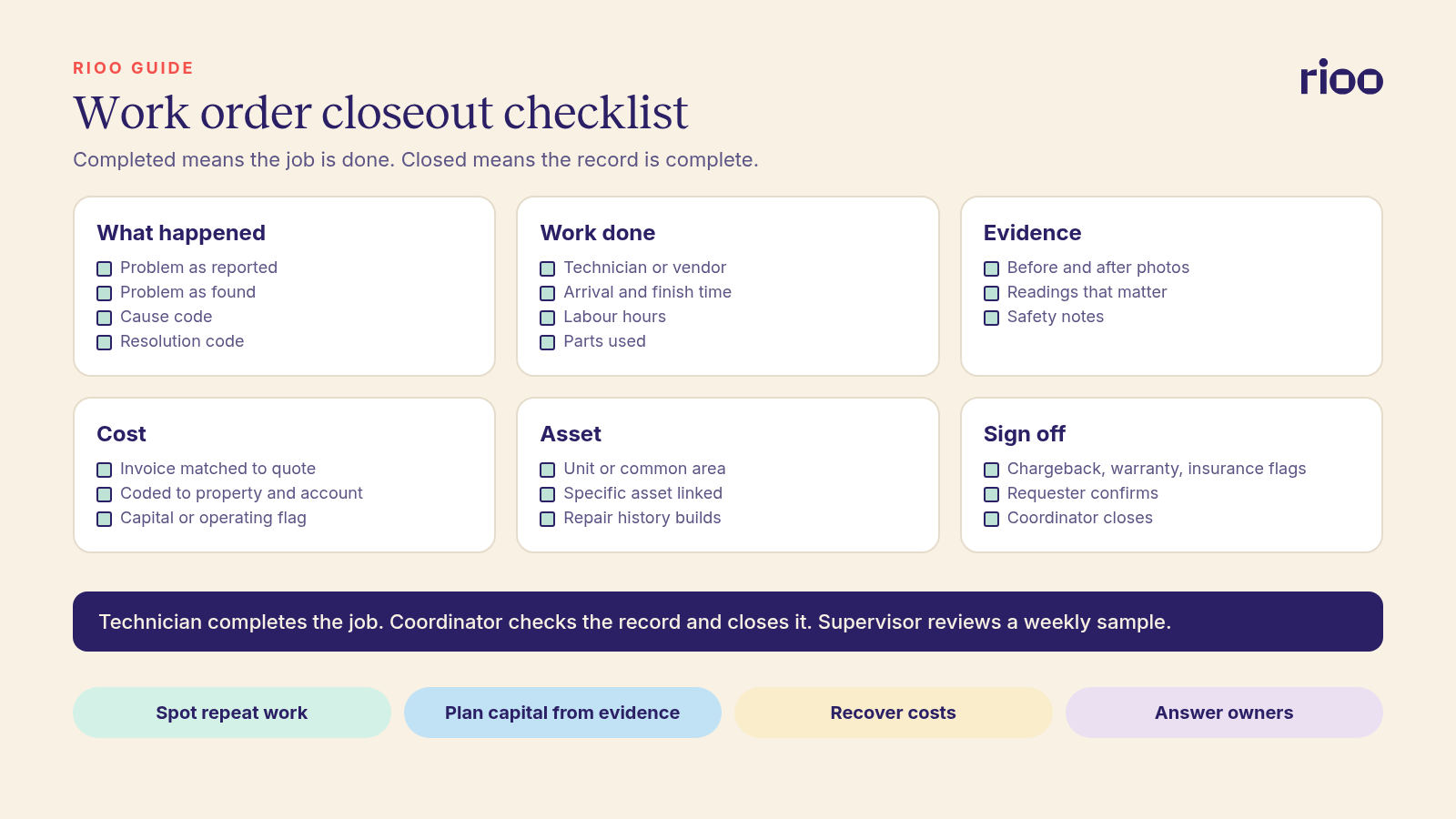
What happened
- Problem as reported, in the requester's words.
- Problem as found, in the technician's words. These often differ.
- Cause code from a short fixed list, such as wear and tear, misuse or damage, weather, installation fault, or unknown.
- Resolution code, such as repaired, replaced, adjusted, temporary fix, or referred to vendor.
The work done
- Technician or vendor name.
- Arrival time and completion time.
- Labour hours.
- Parts used, with quantities. Link them to stock if you keep any.
- Whether the fix is permanent or temporary. A temporary fix should open a follow up work order automatically.
Evidence
- Before and after photos, taken from the same angle where possible.
- Any readings that matter, such as temperatures, pressures or moisture levels.
- Safety notes, such as a gas check or an isolated circuit.
Cost
- Vendor invoice matched to the work order, with the amount checked against the quote or rate card.
- The cost coded to the right property, unit and account.
- Capital or operating flag, where your policy requires it.
Asset and location
- The unit, common area or space.
- The specific asset, such as the water heater in unit 4B or rooftop unit 2. This is what makes asset history possible.
Follow up and recovery
- Chargeback flag: should the tenant be billed? Note the lease clause and attach the evidence.
- Warranty flag: is the asset or the previous repair still under warranty?
- Insurance flag: could this be part of a claim?
- Requester sign off or a satisfaction rating, collected by message or through the portal.
Who should close a work order?
The technician completes the job. A coordinator or supervisor closes the record. This split matters. The person who did the work is not the best person to check that the record is complete. In small teams where one person does both, use a weekly sample review instead.
A simple rule set works for most portfolios:
- The technician must fill the required fields before marking the job completed.
- The coordinator checks completeness and the cost match, then closes.
- Jobs above a set cost, or with a chargeback flag, need a supervisor review.
- The requester gets a short message asking if the issue is fixed. A "no" reopens the work order.
A weekly quality check
Once a week, a supervisor pulls a random sample of closed work orders, say 10 per property or 5 percent of the total, and scores each one:
- Are cause and resolution codes filled and sensible?
- Are photos present and clear?
- Is the asset linked?
- Does the cost match the invoice and the right account?
- Was the requester asked, and what did they say?
Share the scores with the team. Most teams improve quickly once they know the records are read.
What good closeout data lets you do
Complete records pay off in several places.
- Spot repeat work. Cause codes and asset links show which units and assets keep failing. Repeat visits are a common hidden cost, as we explain in our piece on repeat maintenance visits.
- Build capital plans from evidence. Repair history by asset shows what to replace and when. See why work order history is not a capital plan yet for how to get there.
- Recover costs. Chargebacks and warranty claims need proof. Photos and notes on the work order are that proof.
- Hold vendors to account. Arrival and completion times show whether vendors meet agreed response times.
- Answer owners. When repair spend rises, you can show which assets and causes drove it.
- Handle disputes. A tenant claim that a repair was never done is easy to answer with dated photos and a sign off.
A starter list of cause and resolution codes
Short, fixed lists are easier to use on a phone and easier to report on. Here is a starting point you can adapt.
| Cause codes | Resolution codes |
|---|---|
| Normal wear and tear | Repaired |
| Tenant misuse or damage | Replaced part |
| Weather or external event | Replaced asset |
| Installation or workmanship fault | Adjusted or cleaned |
| Age or end of life | Temporary fix, follow up needed |
| Pests | Referred to specialist vendor |
| Blockage | No fault found |
| Unknown, needs investigation | Cancelled or duplicate |
Review the codes after a quarter. If "unknown" or "other" is picked on more than a small share of jobs, the list needs a clearer option or the team needs a short refresher.
Make the form work on a phone
Technicians close jobs in plant rooms and stairwells, not at desks. Put required fields first, use pick lists instead of typing, let the camera attach photos in one tap, and save drafts when the signal drops. A form that takes ten minutes on a phone will be skipped.
A worked example
A tenant reports "kitchen sink leaking". The technician finds a cracked trap and a loose supply connection.
- Problem as found: cracked P trap, loose cold supply.
- Cause code: wear and tear. Resolution code: replaced part, with a note that the cold supply was also tightened.
- Labour: 0.75 hours. Parts: one trap kit.
- Photos: under sink before and after, plus a dry cabinet floor after a 10 minute test.
- Asset: kitchen sink, unit 12C.
- Chargeback: no. Warranty: no.
- Tenant reply next day: "All good, thanks."
Six months later, unit 12C reports another leak. The new work order shows the previous visit, the parts used and the photos. The technician knows to check the cabinet base for water damage straight away, and the coordinator can see whether the earlier repair failed.
Common mistakes
- Free text only. "Fixed" and "done" cannot be counted or searched.
- Too many codes. A list of 60 cause codes gets ignored. Start with 8 to 12.
- Closing before the invoice arrives. Cost data then never lands on the work order.
- No asset link. Without it, you know the unit but not which equipment failed.
- Counting completed as closed. Your speed metric looks good while the records stay empty.
Where RIOO fits
In RIOO, service requests, work orders and costs live in the same NetSuite database as leases and the general ledger. Work order management lets technicians add notes, photos, labour and parts from mobile. Vendor bills link to the work order, so costs post to the right property and account. Linking work orders to records in utility and asset management builds the repair history by asset that capital planning needs. Because it is one system, a chargeback flagged on a work order can become a tenant charge without being typed in again.
Frequently asked questions
What is the difference between a completed and a closed work order?
Completed means the work is done. Closed means the record has been checked, costs are matched and the requester has confirmed or had the chance to.
Should tenants confirm a repair before the work order closes?
It is good practice. Send a short message after completion and reopen the job if the tenant says the issue is not fixed. Close automatically if there is no reply after a set number of days.
How many cause codes should we use?
Start with about 8 to 12 clear codes. Add more only when a code is used often enough to justify it.
Do we need photos on every work order?
Photos help most on damage, chargebacks, safety work and anything a tenant might dispute. Many teams require them on all jobs because it is simpler to enforce one rule.
Who should review closed work orders?
A supervisor or maintenance manager, using a weekly random sample, plus full review of high cost jobs and chargebacks.