





- Tenant portalSynced
- Mobile appPosted
- AutopayReady
- Payment methodsOn track
- Pay several charges at onceApproved
Platform · Finances
Online rent collection tools that make paying rent the easy part
RIOO gives residents and commercial tenants simple ways to pay online: the tenant portal, the mobile app, autopay and a choice of payment methods. Every payment lands on the right tenant ledger and posts to NetSuite automatically, so the convenience tenants see is matched by clean books behind it.
Tenant portal · Pay rentUnit 4B
Balance due this month$1,967.18
- Rent · July$1,850.00
- Parking$75.00
- Water (RUBS)$42.18
Bank (ACH)CardAutopay
Pay nowReceipt sent instantly
What are online rent collection tools?
Online rent collection tools are the tenant-facing payment channels a landlord offers: a web portal, a mobile app, recurring autopay, and accepted methods such as bank transfer (ACH or direct debit) and cards. Good tools make the balance obvious, take a payment in a few taps, confirm it instantly and remind tenants before rent is due.
This page covers those channels. For the overall rent collection capability, including charges, schedules and accounting, see collecting rent payments. For collections operations, delinquency and follow-up, see rent collection services.
Why does adoption matter, and how do you raise it?
The more tenants pay online, and especially by autopay, the fewer late payments and manual receipts your team handles. Raise adoption by inviting tenants to the portal at lease signing, making autopay the default suggestion, removing fees for bank payments where you can, and sending reminders with a direct payment link. Track autopay enrolment and online share by property.
What happens when an online payment fails?
A returned bank payment reverses the receipt in NetSuite, reopens the invoice and notifies the resident. Your policy decides whether a returned-payment fee applies and whether the resident may continue paying online. Repeated failures can switch the account to certified funds only.
Why do online payments improve collections?
Online payments remove the friction of cheques and office visits, autopay removes the need to remember a due date and receipts post immediately, so staff see who has paid without waiting for deposits to clear. Properties with high autopay adoption typically see fewer late payments and spend far less time on manual receipting.
How it works
How does a tenant pay online?
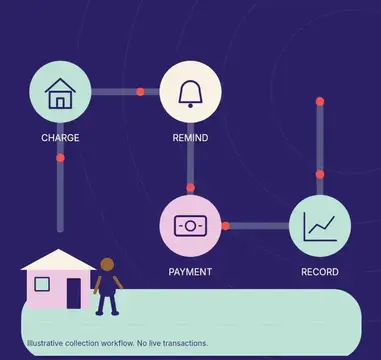
A tenant pays online in a few steps: they get a text or email reminder a few days before rent is due, open the link to their balance in the portal or app, choose a saved bank account or card, confirm the amount, and receive a receipt while the payment posts to their ledger.
- 01
Get the reminder
A text or email a few days before rent is due links to the portal.
- 02
Review the balance
The tenant sees rent and any other open charges, itemised.
- 03
Choose a method
Saved bank account or card, or a new one.
- 04
Pay or enrol in autopay
One-off payment, or recurring from next month.
- 05
Receive a receipt
Confirmation arrives instantly.
- 06
Behind the scenes
The payment applies to the tenant ledger, posts to NetSuite and appears in the bank reconciliation.
How it works
How do you move residents from cheques to online payment?
You move residents from cheques to online payment by making online payment the first option on every invoice and notice, enrolling new leases in autopay at signing, sending payment links by text and email, and helping hesitant residents set up their first payment, then tracking adoption by property.
- 01
Make online payment the first option on every invoice and notice.
- 02
Offer free bank payments while charging only the provider's card fee.
- 03
Enrol new residents in autopay at lease signing.
- 04
Send reminders before due dates with a pay link.
- 05
Stop accepting cash and reduce cheque handling where law allows.
- 06
Track adoption by property and follow up with low-adoption sites.
How are online payments kept secure?
Card and bank details are held by PCI-compliant payment providers rather than in RIOO or NetSuite, payments are tokenised, and access to payment settings is limited by NetSuite role. Residents authenticate to the portal before paying, and every payment is logged with time, method and amount.
In detail
Which payment channels does RIOO offer tenants?
RIOO offers tenants several payment channels: the tenant portal for residents and commercial tenants, mobile access, pay-by-link from invoice emails and texts, autopay for recurring charges, and bank and card payments through integrated gateways. Every channel posts to the same NetSuite tenant ledger.
Tenant portal
Residents and commercial tenants log in to see their balance, open charges and history, and pay in a few steps. See tenant portal.
Mobile app
The same balance and payment flow on a phone, plus receipts and payment history.
Autopay
Tenants schedule recurring payments for rent and regular charges, with notice before each debit.
Payment methods
Bank payments and cards through integrated gateways such as Cardknox, AsiaPay and Cybersource, depending on market and merchant setup.
Pay several charges at once
Rent, utilities, parking and fees in one payment, allocated correctly.
Partial payments where allowed
Configure whether partial payments are accepted per property or lease.
Instant confirmation
Receipts by email or SMS the moment a payment is made.
Reminders
Scheduled reminders before the due date and after a missed payment, through messaging integrations.
What happens after a tenant pays?
After a tenant pays, the payment becomes a NetSuite customer payment on their record, applied to open charges by your rules, posted to bank and receivables accounts and visible in reports immediately. A returned payment reverses on the same ledger. RIOO reports $160M+ in monthly rent collected on riooapp.com.
Compare
What does an online rent payment cost?
An online rent payment's cost depends on the method and your merchant agreement with the gateway. Bank payments usually carry a flat fee and card payments a percentage-based fee. Many operators absorb bank fees and pass card fees on where law allows, so check surcharge rules first.
| Method | Typical cost basis | Settlement | Return or chargeback risk |
|---|---|---|---|
| ACH or direct debit | Flat per transaction | One to several business days | Returns for insufficient funds |
| Debit card | Flat or percentage | Fast | Low to moderate |
| Credit card | Percentage of amount | Fast | Chargebacks |
| Autopay | Same as underlying method | Scheduled | Lower, if account is valid |
Use cases
Which features make online payment easy for residents?
The features that make online payment easy for residents are pay-from-a-link reminders, saved payment methods, autopay with advance notice, a clear balance showing what each charge is for, instant receipts, partial payments where policy allows, and mobile access, so paying rent takes a minute rather than a cheque.
Pay from a link
Invoice emails and texts link straight to the balance with no login friction.
Saved methods
Residents store a bank account or card securely with the payment provider.
Autopay
Pays the balance or a fixed amount on a chosen date.
Split payments
Roommates or guarantors pay their share separately.
Receipts
Instant confirmation and a receipt history in the portal.
Mobile-friendly
Works in any phone browser.
Who should NOT rely only on online payment?
Landlords should not rely only on online payment where some residents cannot or will not pay online, or where jurisdictions and housing programmes require other methods. Keep at least one alternative, such as cheques, money orders or a cash payment network, and record it on the same ledger.
Compare
How do payment methods compare?
Payment methods compare on resident convenience, settlement speed, processing cost and return risk. Bank payments are low-cost but can be returned; cards settle reliably but cost more; autopay maximises on-time payment; cheques and cash cost staff time. The table sets out each method.
| Method | Tenant experience | Landlord consideration |
|---|---|---|
| ACH or direct debit | Low or no fee, ideal for autopay | Returns can arrive days later; reversal workflow needed |
| Debit or credit card | Instant, familiar | Card fees; surcharging rules vary by jurisdiction |
| Digital wallets | Fast on mobile | Gateway support varies |
| Cheque or PDC | Familiar in some markets | Manual handling; see RIOO in the UAE for PDC tracking |
Checklist
Online payment setup checklist
- Choose payment gateways and confirm fees per method.
- Decide who pays card fees and check local surcharge rules.
- Connect deposit bank accounts per property or entity.
- Configure autopay rules and retry behaviour for failed payments.
- Set returned-payment fees within local limits.
- Test a payment end to end before inviting residents.
Talk to a specialist
See online rent collection tools on your own portfolio.
Every payment lands on the right tenant ledger and posts to NetSuite automatically, so the convenience tenants see is matched by clean books behind it.
What is the best way to collect rent online?
Offer a tenant portal and mobile app with clear balances, autopay and low-cost bank payments, plus cards for flexibility. Make sure each payment posts automatically to the tenant ledger and your accounting system, so convenience for tenants doesn't create reconciliation work for you.
Can tenants set up autopay for rent?
Yes. Tenants can enrol in autopay for rent and other recurring charges through the RIOO portal or app, choosing a bank account or card and a payment date. They get a notification before each payment, can update payment details at any time, and every autopay receipt posts to their NetSuite ledger.
Which payment methods can tenants use with RIOO?
Tenants can pay by bank transfer, such as ACH or direct debit, and by card through integrated gateways including Cardknox, AsiaPay and Cybersource, depending on your market and merchant account. Every payment posts to the tenant's NetSuite ledger. Confirm the exact methods available for your setup during implementation.
Do online rent payments post to the general ledger automatically?
Yes. Each online rent payment in RIOO is a NetSuite customer payment, applied to the tenant's open charges by your rules and posted to the bank and receivables accounts as it is received. There are no imports, batch uploads or manual journals, so the general ledger and tenant ledger always agree.
How are returned ACH payments handled?
When an ACH payment is returned, RIOO reverses it on the tenant ledger and the original charges reopen as unpaid. A returned-payment fee can be added where the lease and local law allow, and the tenant is notified to pay again, with the reversal and any fee posting to the same NetSuite ledger.
Which gateways does RIOO support?
RIOO integrates with payment gateways including Cardknox, AsiaPay and Cybersource, covering bank and card payments across North America and Asia-Pacific, with others listed in the integrations directory. The right gateway depends on your countries, currencies and merchant setup, and every payment posts to NetSuite the same way.
Can residents pay partial amounts?
Yes, if your policy allows partial payments. In RIOO, a partial payment applies to the oldest open charges first unless you configure a different order, such as rent before fees. Some jurisdictions and eviction processes treat partial payments differently, so set the policy per property with your advisers.
Do online payments reconcile automatically?
Largely, yes. Online payments apply to tenant invoices as NetSuite customer payments and are grouped into bank deposits that match the settlement amounts from the gateway. Bank reconciliation in NetSuite then matches those deposits to bank statement lines, so finance reviews exceptions instead of matching each rent payment.
Can residents pay with a digital wallet?
Digital wallet payments, such as Apple Pay or Google Pay, depend on the payment gateway and merchant setup you use with RIOO. Where the gateway supports them, wallet payments post to the tenant ledger like any card payment. Confirm wallet support for your gateway during implementation.
How quickly do online payments show on the ledger?
Online payments show on the RIOO tenant ledger immediately on submission as a pending receipt, so residents and staff can see the payment straight away. The receipt is then settled when the payment provider confirms the funds, typically after the bank or card network clears the transaction.
Related
Related to online rent collection tools